CORS in Flask — Bridging Frontend and Backend
How Cross-Origin Resource Sharing works and how flask-cors fixes CORS errors between your frontend and Flask API.
What Is CORS?
CORS stands for Cross-Origin Resource Sharing. It's a browser security mechanism that restricts web pages from making requests to a different origin — where origin means the combination of protocol, domain, and port.
When your React frontend at localhost:5173 makes a request to your Flask API at localhost:5000, the browser sees two different origins (different ports) and blocks the request by default. This is the same-origin policy in action.
The server must explicitly opt in to cross-origin requests by including the correct Access-Control-Allow-Origin header in its responses. Without it, the browser rejects the response before your JavaScript ever sees it.
The Fix: flask-cors
Flask doesn't handle CORS by default. The flask-cors package adds the required headers automatically. Install it:
pip install flask-corsBasic Usage
For development or internal tools where any origin should be allowed, wrap your app with CORS():
from flask import Flask
from flask_cors import CORS

app = Flask(__name__)
CORS(app)
This adds Access-Control-Allow-Origin: * to all responses — every origin can access your API. Useful during development; avoid in production.
Advanced Configuration
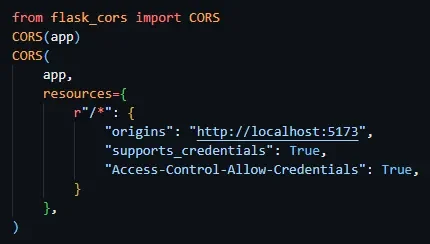
For production, restrict access to specific origins and configure credential handling — required whenever your frontend authenticates with Flask session cookies:
from flask import Flask
from flask_cors import CORS

app = Flask(__name__)

CORS(app, resources={
    r"/*": {
        "origins": "http://localhost:5173",
        "supports_credentials": True,
        "Access-Control-Allow-Credentials": True
    }
})
Configuration Options
origins— allowed origin(s): a string, list, or"*"for allsupports_credentials— allow cookies and Authorization headers in cross-origin requestsmethods— restrict to specific HTTP methods:["GET", "POST"]allow_headers— specify which request headers are allowedr"/*"— route pattern: applies config to all routes (user"/api/*"to scope it)
Preflight Requests
For non-simple requests (custom headers, DELETE, PUT, requests with credentials), the browser sends an OPTIONS preflight request first — asking the server: "will you allow this?" The server must respond with the right Access-Control-Allow-* headers before the browser sends the actual request.
flask-cors handles preflight responses automatically — no extra code needed.
Common CORS Pitfalls
- Credentials + wildcard origin — browsers reject
Access-Control-Allow-Origin: *when credentials are included. Must specify an explicit origin. - Trailing slash mismatch —
http://localhost:5173andhttp://localhost:5173/are treated as different origins by some browsers. - HTTP vs HTTPS — protocol is part of the origin. A production HTTPS frontend cannot access an HTTP backend without CORS headers configured for the HTTPS origin.