HTTP Methods — Enhancing Web Communication
GET, POST, PUT, DELETE, PATCH, HEAD, OPTIONS explained with Python requests library examples.
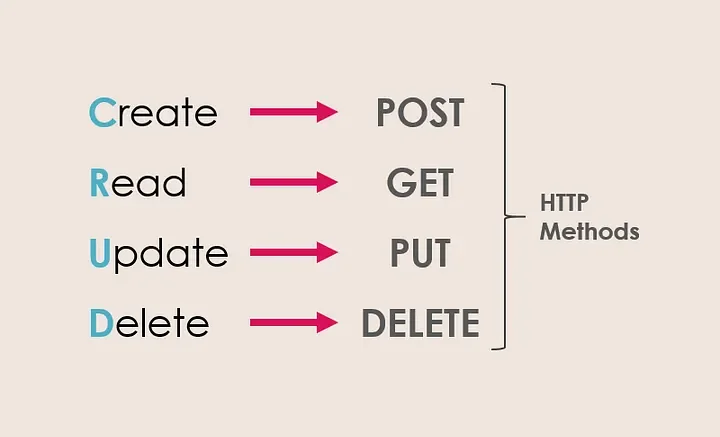
The HTTP Methods
Every HTTP request includes a method (verb) that tells the server what operation the client wants to perform. Choosing the right method makes APIs predictable, cacheable, and RESTful.
GET — Retrieve Data
Fetches a resource from the server. Parameters are appended to the URL. Never use GET for sensitive data — the URL is visible in browser history, server logs, and referrer headers. Every image a page loads arrives via GET too — lazy loading is the art of deferring those requests until they're needed.
POST — Submit Data
Sends data to the server to create a new resource or trigger a state change. Data goes in the request body — not the URL. The right choice for form submissions, file uploads, and anything that changes server state — it's the verb behind every login form.
PUT — Replace a Resource
Sends a complete replacement for an existing resource. If the resource doesn't exist, PUT creates it. The key distinction from PATCH: you must send the entire representation, not just the changed fields.
DELETE — Remove a Resource
Removes the specified resource from the server. Used to eliminate unnecessary or outdated data. Idempotent — calling DELETE on an already-deleted resource should return the same result.
PATCH — Partial Update
Updates specific fields of a resource without replacing the entire object. Use PATCH when you only want to change one attribute and leave the rest untouched — more efficient than PUT for large resources.
HEAD — Headers Only
Identical to GET but returns only the response headers, no body. Useful for checking if a resource exists, checking its size (Content-Length), or validating cache freshness without downloading the full content.
OPTIONS — Query Capabilities
Asks the server which HTTP methods are supported for a given endpoint. Browsers use OPTIONS automatically for CORS preflight requests — checking if cross-origin requests are allowed before sending the actual request.
Python Examples with requests
import requests

# GET — retrieve user data
response = requests.get('https://api.example.com/users/123')

# POST — create a new user
data = {'name': 'John Doe', 'email': '[email protected]'}
response = requests.post('https://api.example.com/users', json=data)

# PUT — replace user record entirely
data = {'name': 'Jane Doe', 'email': '[email protected]'}
response = requests.put('https://api.example.com/users/123', json=data)

# PATCH — update just the name
response = requests.patch('https://api.example.com/users/123', json={'name': 'Jane Doe'})

# DELETE — remove the user
response = requests.delete('https://api.example.com/users/123')

# HEAD — check if resource exists without downloading body
response = requests.head('https://api.example.com/users/123')

# OPTIONS — query supported methods
response = requests.options('https://api.example.com/users/123')
Quick Reference
- GET: safe, idempotent — use for all read operations
- POST: not safe, not idempotent — creates new resources, triggers actions
- PUT: idempotent — full replacement, same result if called multiple times
- PATCH: not always idempotent — partial update, only changed fields
- DELETE: idempotent — remove resource, repeated calls return same result
- HEAD: safe, idempotent — metadata check, no body
- OPTIONS: safe — capability discovery, used in CORS preflight