if __name__ == '__main__' in Python
The __name__ variable, top-level code, and why guarding entry-point logic prevents unintended execution when a module is imported.
__name__ variable is "__main__" when a script runs directly — and the module name when imported.
if __name__ == "__main__" is a Python idiom that runs a block of code only when the file is executed directly — and skips it when the file is imported as a module.
It works because the interpreter assigns every module a __name__ variable before executing it: the file you launch with python app.py gets the string "__main__", while any file loaded via import gets its own module name ("check1" for check1.py).
Since Python executes all top-level code on import, an unguarded function call or script action runs the moment someone imports your file — usually an unwanted side effect.
The guard separates the two roles a file can play: reusable library (functions and classes, importable anywhere) and executable script (the entry-point logic inside the guard).
One file, both jobs, no accidental execution.
What Is if __name__ == "__main__"?
Every Python file has a built-in variable called __name__.
When Python runs a file directly (e.g., python app.py), it sets __name__ to the string "__main__".
When that same file is imported by another script, __name__ is set to the module's filename instead.
The guard if __name__ == "__main__": lets you write code that only executes when the file is the entry point — not when it's imported as a library.
What Is Top-Level Code?
Top-level code is any code at the outermost indentation — not inside a function or class.
Python executes all top-level code from top to bottom when a file is run.
The file Python runs first is the top-level module, and its __name__ is "__main__".
Note the subtlety: importing also executes top-level code.
def and class statements are themselves top-level code — executing them is how the functions and classes come into existence.
What the guard controls is everything else: the calls, prints, and side effects you only want when the file is the program, not the library.
How Does __name__ Get Set?
__name__ isn't magic you declare — the interpreter assigns it to every module object before running the module's code:
- Run directly (
python app.py): Python creates a module named__main__and executes the file inside it — so__name__is"__main__" - Imported (
import app): the import system creates a module object named after the file —__name__is"app". On a second import, Python finds the cached module insys.modulesand doesn't re-execute the file at all - Run with
-m(python -m app): the module is located on the import path but still executes as the entry point, so__name__is again"__main__"— this is howpython -m venvandpython -m http.serverwork - Packages: a file literally named
__main__.pyinside a package runs when you executepython -m package_name— the same idea promoted to package level
Run as Script vs Imported — Side by Side
| Behavior | python check1.py | import check1 |
|---|---|---|
Value of __name__ | "__main__" | "check1" |
| Top-level code (defs, prints) | Executes | Executes (first import only) |
| Code inside the guard | Executes | Skipped |
| Functions and classes defined | Yes | Yes — that's the point of importing |
| Typical role of the file | Program / entry point | Reusable library module |
Three Files — Three Scenarios
Create three Python files to see how __name__ behaves:
app.py — run directly, no imports:
print(__name__)
print("This is main script")
Output: __main__ — Python confirms this file is the entry point.
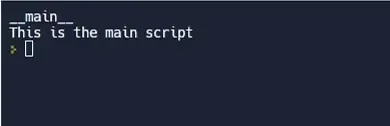
__name__ to "__main__".check1.py — function guarded by if __name__ == "__main__":
def my_function():
    print("Hello, World!")

if __name__ == "__main__":
    my_function()
When you import check1 from another script, my_function() does not run — the guard prevents it:
import check1
print(check1.__name__)     # check1
print("This is main script")
check2.py — function called at top level (no guard):
def my_function():
    print("Hello, World!")

my_function()   # runs on import — no guard!
Importing check2 will call my_function() immediately — an unintended side effect.
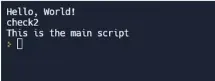
if __name__ == '__main__' to keep your scripts reusable as modules — the guard separates entry-point logic from importable functions."
What Is the Standard main() Pattern?
Real scripts rarely put logic directly inside the guard. The convention is to wrap the entry-point logic in a main() function and keep the guard to a single line:
import sys

def main() -> int:
    name = sys.argv[1] if len(sys.argv) > 1 else "world"
    print("Hello, " + name + "!")
    return 0

if __name__ == "__main__":
    raise SystemExit(main())
This buys you three things.
First, testability — a test file can import the module and call main() with controlled inputs, which is impossible if the logic sits loose inside the guard.
Second, clean scoping — variables inside main() are local, whereas variables created at top level are module globals that every function can accidentally read.
Third, a proper exit code — returning an int and passing it to SystemExit means shells and CI pipelines can tell success (0) from failure (non-zero).
Video Walkthrough
When to Use It
- Always — wrap any code that should only run when the file is the entry point
- Tests and demos — put quick test calls or demo output inside the guard
- CLI scripts — put your
main()call inside the guard so the file is importable as a module - Multiprocessing — on Windows and macOS,
multiprocessingstarts workers by re-importing your script; without the guard, each worker re-runs the spawning code and the program crashes or forks endlessly. Here the guard isn't style — it's required. The same applies when a script is bundled into an .exe with PyInstaller — frozen apps re-import the entry module too - Never inside functions/classes — the guard belongs at the top level
One place you can skip it: pure library modules that are only ever imported and contain nothing but definitions. With no top-level side effects to protect, the guard adds nothing — though many developers still include one to hold a quick demo or smoke test.